
Your SharePoint is messy. You’re not alone.
You don’t need to know the solution. You just need to know what’s getting harder.

2013
Microsoft 365 specialists since
Microsoft
Partner of the Year Award winner, 2023
Five
Steps in the process below, all of it yours
24hr
call back. We aim for 15 minutes
You didn’t do SharePoint wrong.
Microsoft 365 environments rarely stay the way they were designed. Organisations grow, people change roles, new Teams and sites get created, ways of working evolve. Over time that can mean:
- People can’t find the information they need, so they ask someone, or make another copy.
- Nine versions of the same policy, and nobody is sure which one is right.
- Sites and Teams with no owner, because the owner left in 2021.
- Governance and permissions that live in one person’s head.
- Teams and sites nobody has opened in years, and nobody wants to be the one to delete
- You’re using Copilot, but you can’t trust the information it’s returning.

These are signs your digital workplace needs to catch up with your organisation, and the fix starts with knowing what to fix first.
The five steps to a better-structured Microsoft 365 environment
At FiveP, we’ve helped organisations work through these challenges for over a decade. And while every Microsoft 365 environment is different, the approach to understanding the problems and making the right decisions doesn’t need to be complicated.
We’ve broken our process into five practical steps, with the working documents and templates we use in our own engagements.
Take the resources, work through them with your team, or have us help you through the process.
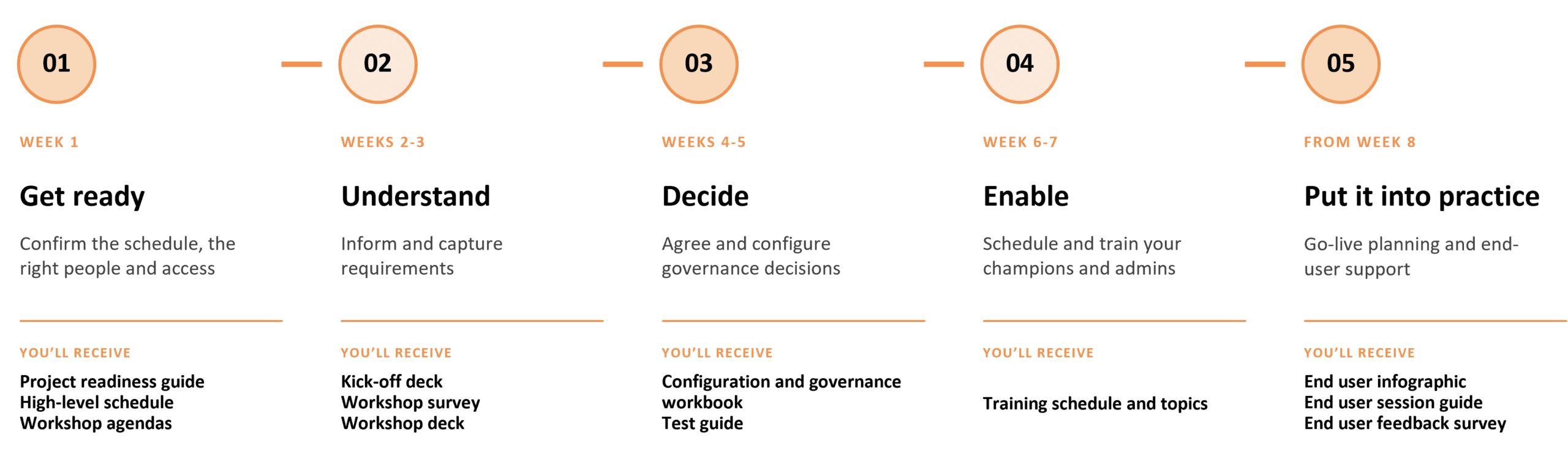
Week 1: Get Ready
Preparation is key: Nobody knows where to start, no one has nominated a sponsor and project manager, IT was not told a Global Administrator would be needed for an hour, and the people who actually know how the business works were never invited.
Setting you up for success from the first step will save weeks of rescheduling. The information you receive for week 1 will help you set-up and identify who and what you need for the activities ahead.
Week 2 to 3: Understand
Inform and understand how you work: Creating an effective collaboration environment starts with establishing a shared understanding of the desired outcomes and gaining insight into how people work today through surveys and workshops.
These discussions help uncover the essential collaboration behaviours, processes and governance requirements needed to support and align with the way your organisation operates.
Week 4 to 5: Decide
Finalise governance decisions: Effective Microsoft 365 governance does not require hundreds of decisions. It comes from defining a small number of core standards and applying them consistently. These standards determine how workspaces are created, managed, reviewed and retired, ensuring collaboration remains secure, organised and scalable.
The workbook captures these decisions in a structured format and recommended settings provided as a baseline. This approach simplifies the process by enabling you to validate and adjust proven recommendations rather than starting with a blank page.
Week 6 to7: Enable
Turn knowledge into action: Enabling champions and administrators is critical to a successful rollout. Early training ensures key stakeholders understand their roles and are ready to support users throughout the change.
Structured training sessions provide champions and administrators with the knowledge, tools and confidence needed to drive adoption, reinforce governance and support long-term success.
From Week 8: Put it into practice
Setting you up for success: A successful go-live requires more than simply launching the solution. End users need clear guidance, practical support and opportunities to learn how to make the most of the new features available to them.
Through targeted communications, awareness sessions and feedback opportunities, this phase helps drive readiness, encourage engagement and support the successful adoption of new ways of working.
Everything above, in one email.
These are the working files from our engagements, not marketing summaries. Use them inside your organisation as you like. They are general guidance; they do not know your environment, and they are not a substitute for advice on it.
- Project readiness guide and high-level schedule
- Kick-off and workshop deck
- Workshop agendas and survey
- Configuration and governance decision workbook
- Acceptance test guide
- Administrator training curriculum
- End user infographic, session guide and feedback survey
Where it gets harder
Deciding is one job. Making it happen every time is another.
The five steps provide a practical starting point for understanding your Microsoft 365 environment and identifying where improvements may be needed. But knowing what to look for and having the time, resources or expertise to work through it are two different things.
That’s where FiveP can help.
When FiveP implements, we use Orchestry to help automate governance and keep Microsoft 365 organised and manageable. The five steps provide the foundations, while Orchestry helps put them into practice.
Governance tells you what should happen
Orchestry helps make it happen consistently
FiveP helps design, configure and implement it.
How much to you want FiveP to take on?
Start with what your own team can carry.
Path 1
Do it yourself
Best suited to
Teams with skills and capacity to build and run it.
Your team
Everything
FiveP
Supplies the process and kit
Orchestry
Not required
After
You maintain your own processes
Path 2
Orchestry Foundations
Best suited to
A capable Microsoft 365 team wanting a solid Orchestry start.
Your team
Installs, decides on the day, tests, rolls out, administers.
FiveP
Prepares, runs a one-day workshop and configuration, hands over.
Orchestry
Configured by FiveP
After
Your team runs it. Optional support hours.
Path 3
Standard Orchestry Implementation
Best suited to
Teams that want FiveP to carry the implementation to handover.
Your team
Decides, tests, runs it after handover
FiveP
Manages the project, confirms the design in writing, configures, guides your testing, trains administrators and champions, hands over.
Orchestry
Configured, tested, and handed over.
After
Your team runs it, after a short hypercare period.
You don’t need to know the solutions. Just tell us what’s getting harder.
Maybe SharePoint has become difficult to manage, or people can’t find information. Maybe Teams has grown faster than anyone kept track of. Maybe Copilot is coming and you are not confident what it will find. Tell us in a sentence and a FiveP consultant will call you back.
24hrs – A consultant calls back within one business day. In business hours we aim for 15 minutes.
Frequently Asked Questions.
Our SharePoint is a mess. Where do we start?
Start by understanding what’s making it difficult to manage. It might be too many sites, confusing permissions, duplicate documents or nobody knowing who owns what.
You don’t necessarily need to rebuild SharePoint or migrate everything to fix it.
We’ve shared the five steps we use with our clients, along with the tools and templates to help you work through the process. You can do it yourself or have FiveP help.
How do I clean up SharePoint without starting again?
You don’t always need to start from scratch. Often, it’s about reviewing what’s already there, deciding how information should be organised and putting some consistent rules around how SharePoint and Teams are managed.
Our five-step framework helps you work through those decisions before making changes. It’s a practical way to understand what needs fixing and what can stay as it is.
What is Microsoft 365 governance, and why does it matter?
Governance is simply the rules and responsibilities that help keep Microsoft 365 organised, secure and manageable.
Who can create a Team? Who owns a SharePoint site? Who reviews access permissions? What happens when a workspace is no longer needed?
Without clear answers, things can get messy pretty quickly.
Good governance doesn’t have to be complicated. It just needs to be practical, consistent and suited to how your organisation works.
Can we manage SharePoint governance ourselves, or do we need FiveP?
You can absolutely do it yourself.
If your team has the Microsoft 365 expertise, time and capacity to manage governance, our five-step framework and supporting resources give you a practical starting point.
If you’d prefer some guidance, FiveP can help you work through the decisions, configure Orchestry or manage the implementation.
You choose how much support you need.
What is Orchestry, and do we need it to manage SharePoint?
No, you don’t need Orchestry to manage SharePoint governance.
You can establish and maintain governance using Microsoft 365’s existing capabilities and your own processes.
Orchestry is a governance and management platform that helps automate and consistently apply decisions around workspace creation, ownership, lifecycle management and more.
Think of it this way: governance defines the rules, Orchestry helps put them into practice, and FiveP can help you set it all up.
Do we need to clean up SharePoint before introducing Microsoft Copilot?
It’s worth understanding what’s in your Microsoft 365 environment before rolling out Copilot.
Outdated documents, unclear ownership, inconsistent permissions and information spread across multiple locations can affect the quality and security of the information Copilot can access.
That doesn’t mean everything needs to be perfect before you start. But understanding your information structure and governance is an important part of preparing for Copilot.
Our five-step framework can help you identify where to focus your attention.