
Teams get more done with Orchestry for Microsoft 365.
Deploy Orchestry with confidence. FiveP helps organisations use Orchestry to govern, optimise and scale Microsoft 365 for your AI adoption roadmap – without slowing teams down.
- World-first Orchestry Premium Partner
- Microsoft 365, Teams & SharePoint Specialists
- Governance, security, & AI-readiness focused
Microsoft 365 without governance quickly becomes unmanageable.
M365 grows fast – often faster than governance, security, and visibility can keep up. And as your organisation evolves to include AI capabilities such as Copilot, the cost of poor governance increases. Common challenges that we often see include:
- No clean ownership of Teams, SharePoint sites, and workspaces
- Sprawled content across Teams, SharePoint, and OneDrive
- Inconsistent provisioning and lifecycle management
- Poor visibility into usage, security risks, and adoption
- AI tools surfacing the wrong information to the wrong people
If Microsoft feels messy, risky, or hard to manage, Orchestry & FiveP can help. Let’s start today.
Orchestry brings governance, visibility and control to Microsoft 365: The keys to ROI with AI.
Orchestry is a Microsoft 365 governance, provisioning and insights platform that helps organisations stay in control - without hindering productivity.
- Controlled provisioning of Teams, SharePoint sites and workspaces
- Clear ownership, lifecycle management and accountability
- Visibility into usage, risk and adoption across Microsoft 365
- Governance that supports the business instead of blocking it
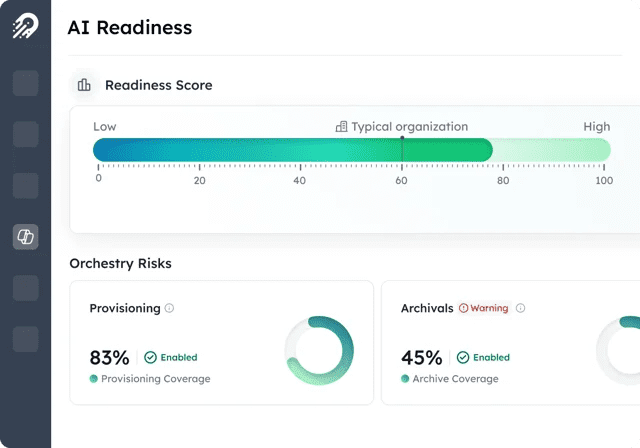
- A stronger foundation for safe, relevant AI insights
FiveP ensures Orchestry is designed, configured, and adopted to suit how your organisation actually works – supporting both today’s governance needs and tomorrow’s AI capabilities.


Request a free Orchestry consult today.
Orchestry Services by FiveP.

Orchestry Advisory & Planning
Assess readiness, define governance requirements, and design the right Orchestry approach for your organisation.

Orchestry Implementation
Configure Orchestry to align with your Microsoft 365 environment, governance model and business processes.

Orchestry for Microsoft Teams
Controlled Teams provisioning, lifecycle management and ownership – without slowing collaboration.

Orchestry for SharePoint
Governed SharePoint site creation, metadata consistency and lifecycle control.

Orchestry Adoption & Enablement
Ensure Orchestry is understood, adopted and used properly by IT and the business.

Orchestry Optimisation & Support
Improve existing Orchestry deployments, fix configuration issues and extend value over time.
FiveP: The first Orchestry premium partner.
FiveP is proud to announce its achievement as Orchestry’s first ever premium partner.
Why organisations choose FiveP.
Business-first SharePoint design | Strong governance and compliance focus
Deep Microsoft 365 and Power Platform expertise | Clear communication – no jargon, no surprises









Customer Story: South Eastern Melbourne Primary Health Network (SEMPHN).
For South Eastern Melbourne Primary Health Network (SEMPHN), operational efficiency is crucial in meeting the unique healthcare needs of the region’s residents and to realise its vision of creating opportunities for these people to live their healthiest lives.
Driven to achieve one of their key strategic goals of organisational excellence, SEMPHN worked with FiveP to rollout a new SharePoint intranet and an integrated Microsoft Teams powered by Orchestry.
“As an organisation, and we didn’t have robust digital systems and processes historically. It was recognised that the information we needed to provide our staff in order for them to do their jobs really well wasn’t available to them at all times and scenarios.”
– Anita Woods
Director of Change and Enablement Services, South East Melbourne Primary Health Network (SEMPHN).
See Orchestry in action. Request a consult today.
Talk to a FiveP Orchestry specialist about governance, visibility and preparing your Microsoft 365 tenant for AI – safely and effectively.
FAQs About Orchesty
What is Orchestry?
Orchestry is a governance platform for Microsoft 365. It controls how Teams, SharePoint sites and workspaces are created, who owns them, and what happens to them when they’re no longer needed. Your people keep working the way they do now. The environment just stops getting messier.
We already have Microsoft 365. Why do we need Orchestry?
Microsoft 365 gives you the tools. It doesn’t keep them in order. Most governance plans work well for about six months. Then the project team moves on, BAU takes over, and things start to drift. Orchestry keeps your governance running after that, with the reporting and automation to back it up
How does Orchestry help with Copilot?
Copilot doesn’t create the mess. It exposes it. AI reads whatever it can reach, so if access is too broad, the wrong people see the wrong things. Orchestry shows you what Copilot can see. It also lets you keep sensitive areas out of Copilot’s reach and stop them syncing offline.
Will Orchestry lock everything down and frustrate our people?
No. Governance that blocks people doesn’t last, so it shouldn’t. People still request their own Teams and sites, through a short guided form. Approvals are optional. Even without them, you get the ownership, structure and metadata you need to stay in control.
Our environment is already a mess. Can Orchestry fix it?
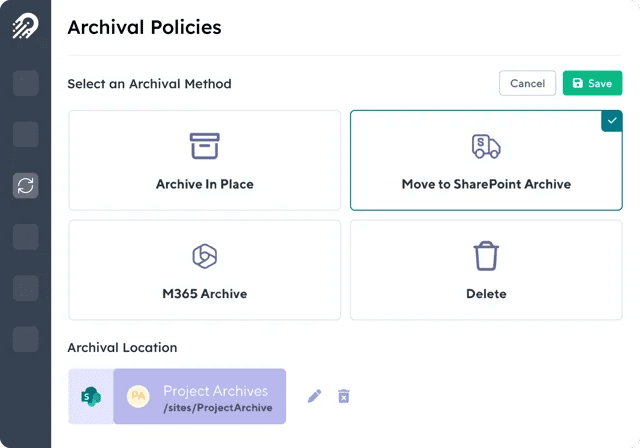
Yes. You’re not alone, either. Orchestry reports on what you already have, including workspaces with no owner, duplicates, broken permissions and oversharing. It then helps you review, archive and clean up. The first clean-up is the heavy lift. After that, policies run quietly in the background.
Does Orchestry replace our records management?
No. Orchestry isn’t a records management system. It works alongside your existing Microsoft retention policies and doesn’t override them. Your recordkeeping obligations are still met by your records platform. Orchestry supports them by keeping ownership clear and making archiving the normal way to retire a workspace.
Can Orchestry stop owners from deleting a Team?
Not directly, and nothing else can either. Microsoft has no setting that lets someone own a Team without being able to delete it. The practical control is who you make an owner. Orchestry helps by requiring multiple owners, running regular ownership reviews, and making archiving the easier path.